
Clear the last bottleneck.

Agents made writing code fast. Bonnie Codes handles what’s slow now: seeing what changed, finding what broke, and proving it works, with formal verification.

macOS (Apple silicon) and Windows · iPhone · Android coming soon · System requirements

The Agents page: six active agents in two projects, one waiting on you. Under chessfiend-app, the Release checklist plan’s Claude agent with the two agents it started below it, and the Bound analysis leases plan’s two agents; each card shows its state, what it’s doing, the plan step it’s on and the files it’s reading or editing, and two cards flag that another agent is changing the same file.
  1. Every agent, on every project
  2. Who’s waiting on you
  3. What’s running now, or everything
  4. Two agents on one file, flagged
  1. The whole job, in one view

    Every plan and the stage it’s at, which agent is on what, and what’s broken, across all your projects. You step in where you’re needed, with the context to make the call.
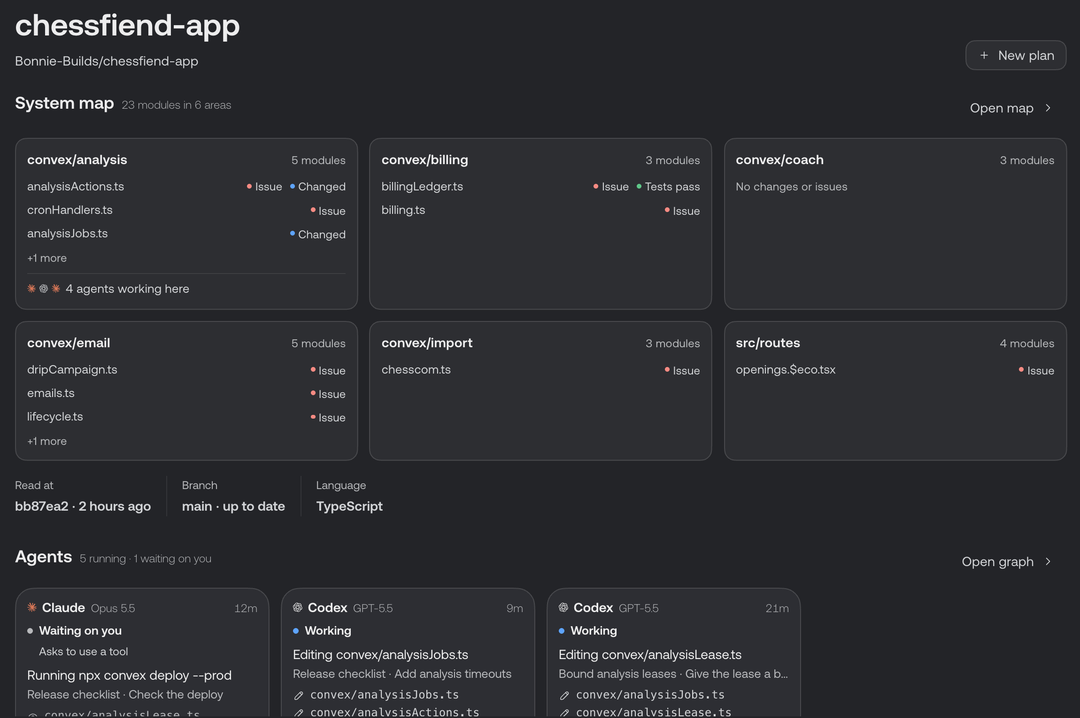
    The overview of chessfiend-app: its system map as six areas, each listing its files with what changed, what has an issue and what passes its tests, one showing four agents working there; the commit it was read at, the branch and the language; and the five running agents, one waiting on you.
    1. Where your agents are working
    2. What changed and what’s broken, by area
    3. Who’s waiting on you
  2. Know your codebase, even the parts you didn’t write

    See what a plan will change before work starts, and what actually changed when it’s done. Your agents work from the same map, so they don’t have to guess where things are.
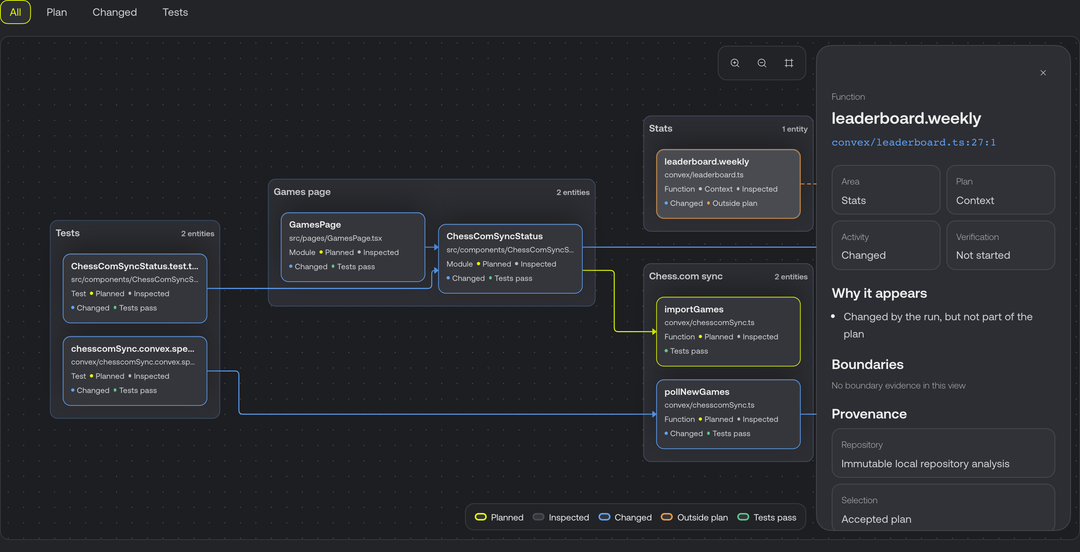
    The system map of the plan “Show Chess.com sync status”: the games page, profiles, the Chess.com sync and their tests, each planned, inspected, changed and passing its tests, and leaderboard.weekly flagged outside the plan, with a panel saying it was changed by the run but not part of the plan.
    1. What the plan changes, and what that connects to
    2. A change outside the plan

Formal verification, from finding bugs to running the work

Today, Bonnie works out what your code is meant to guarantee, checks the code against it, and confirms each bug with a failing test and a passing control. Next, it runs the work itself: each plan becomes a work design built from proved steps, so a task moves to its next stage only when its checks pass, and lands only when you approve it.

How the platform works

On your phone

Check the board, approve plans and answer your agents from your phone, in the same sessions running on your computer.

How it compares to other multi-agent tools

Orca, T3 Code and Herdr run agents side by side in their own worktrees too. Here’s what Bonnie Codes adds on top.

See every comparison
Bonnie Codes beside the most-used multi-agent tools
Bonnie CodesOrcaT3 CodeHerdr
Every task’s stage in one viewYesPartlyPartlyPartly
A plan with acceptance criteria before work startsYesNot describedPartlyNot described
A coordinator that hands out tasks from a boardYesPartlyPartlyPartly
Results checked against the criteria before you reviewYesPartlyNot describedNot described
Sandboxed by defaultYesNot describedNot describedNot described
● Yes ◐ Partly – Not in their docs. From each tool’s own docs, checked 5 Nov 2026; each name links to the sources. Bonnie Codes’ sandbox is macOS only.

Not sure where to start? Tell us what you’re working on.